Do you read more than one Blog? Some times you visit a Blog thinking let’s see what new has been posted, but then there aren’t any new ones. You feel like you wasted time for nothing. If you happen to read more than one Blog like I do, you don’t want to waste your time going Blog by Blog to check them for new posts.
Well, I have a suggestion that will save you the time checking on through your favorite Blogs. Most Blogs and lots of Websites have what they call
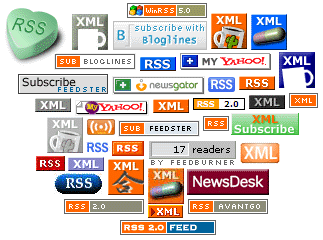
RSS Feeds (Really Simple Syndication) on them. The
little orange icons with the “RSS” letters on them or similar. You can go to those pages and click on the
RSS icon and Subscribe (free) to those RSS Feeds.
You have to have an RSS reader or aggregator. There are plenty of free ones both as a program on your computer or online. I like the online ones better because I use more than one computer at work. I can access the online one from any computer with Internet access.
I use is
Bloglines and it’s real easy to use. You create an account, (supply a e-mail address, pick a user name and a password) pick a few blogs to subscribe to and add any other one you want to. You go to any Website or Blog with RSS icon on it, click on it then added to your Blog Roll (list of your subscriptions.)
After that, all you have to do is log on to your Bloglines account and Bloglines will go to each individual Blog for you and if there are any new posts on any of those blogs or sites, Bloglines will create a list for you. You can then go and read those new posts at without having to go Blog by Blog to check yourself. You can read the articles or summary of them, you can make a clipping of them to read them later, Blog them or E-mail those articles to anyone you want.
Once you’re logged on to Bloglines it will check periodically through all your subscriptions, (about every 5 minutes) and check to see if there are new posts saving you time and work. Bloglines has a search feature that you can use to look for Blogs of your interests no matter what your taste is. Hey, they even provide you with a Blog of your own, if you'd like.